Financial reporting automation
Finance can review results and investigate changes while Databasin handles the repeated data preparation and delivery behind the report. Our team connects the sources, implements the calculations and builds the workflow on our platform. We also provide the applications, training and support that help people use the numbers.
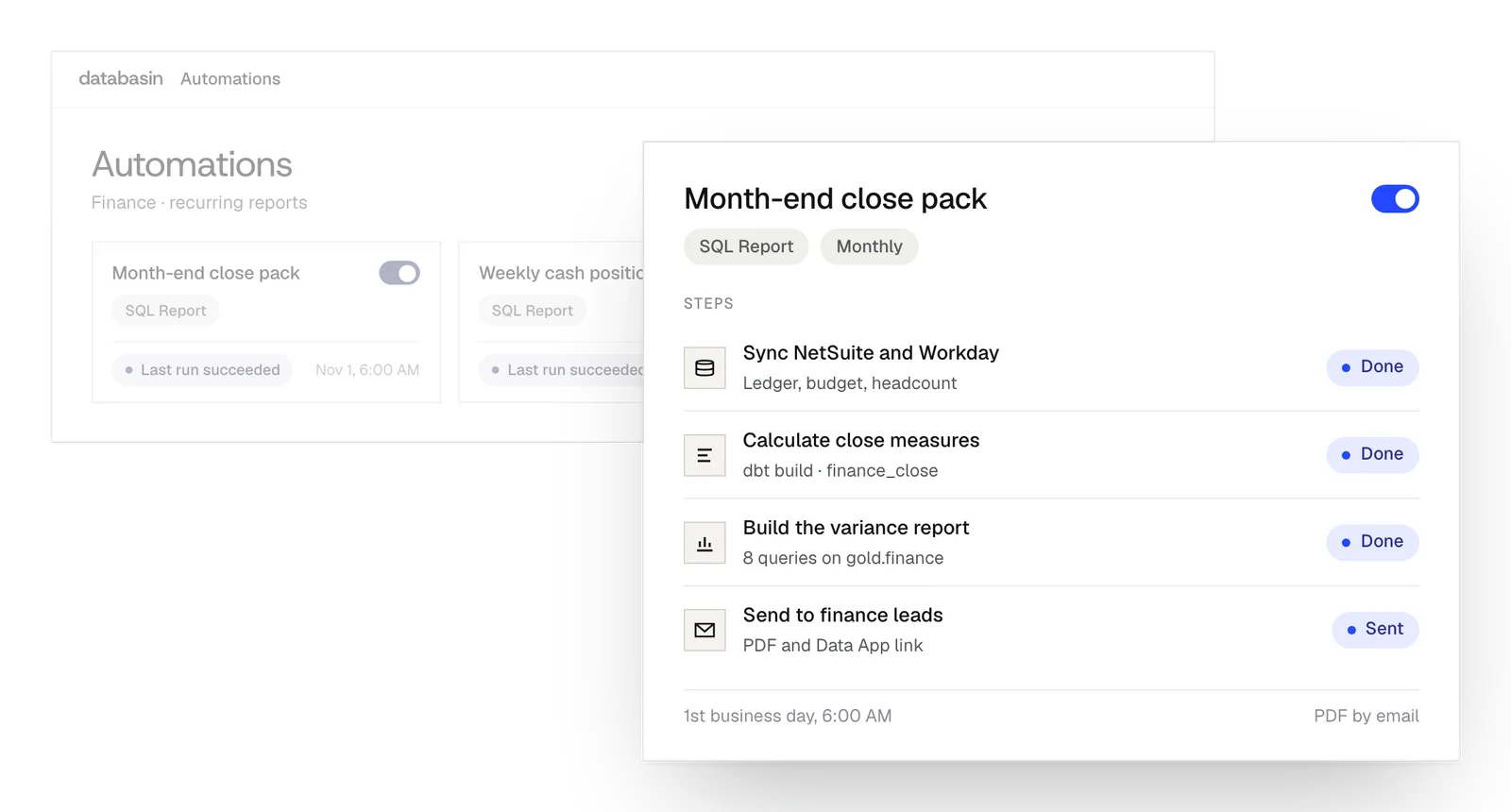





Prepared numbers for the next review
We build the source feeds and calculations into a workflow finance can use each reporting period. That work establishes the records included, the period they describe and the measures used in the report.
The prepared definitions can also supply a Data App. Between meetings, finance can open it to examine a change using the same measures as the scheduled report. We build the application with its data preparation, so a follow-up question has a route to the records and calculation behind the number.
The reporting work we automate
Source collection
Collect refreshed finance and operating records on the schedule needed for the recurring report.
Reporting calculations
Calculate the measures with their shared definitions and the records included in the period under review.
Scheduled delivery
Send the summary, charts or spreadsheet to the people reviewing it through email, Slack or Teams.
How does the reporting workflow run?
Source syncs can finish before SQL or dbt calculations begin, with delivery in a later stage. The automation keeps that order while tasks within each stage can run together. Failed tasks retry. Logs record the run and saved versions preserve the workflow setup, so support staff can examine what happened when a report needs attention.
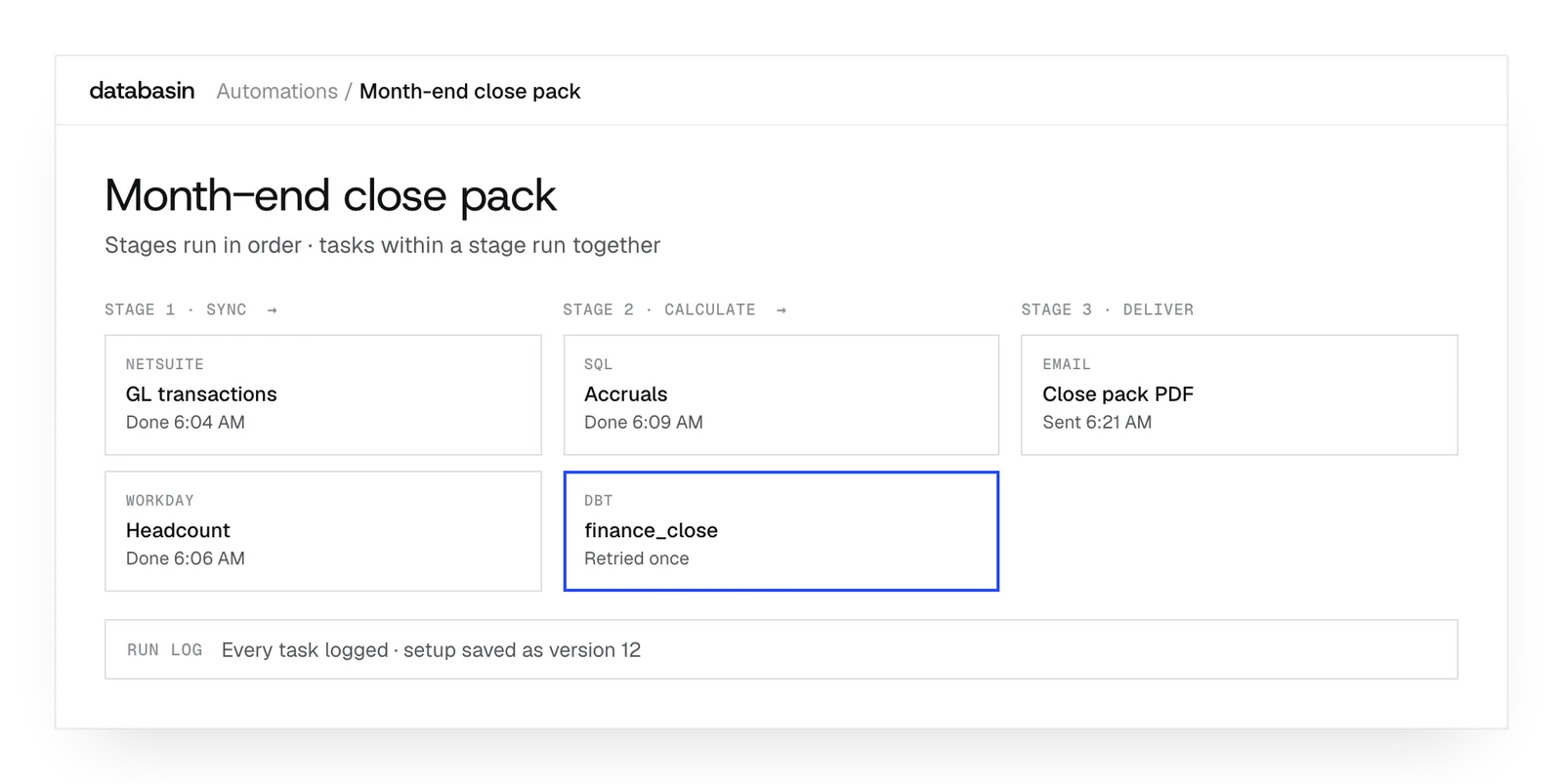
Delivery around the finance process
We implement the preparation and application for finance's recurring review. The work includes examining the current process, establishing definitions and connecting the required sources. Finance can use the resulting views to explore results and investigate a change.
Training, rollout and success measurement are part of the engagement. The team continues to judge the figures and decide what to do. After launch, Databasin can operate the solution, provide monthly support hours or stay on call as reporting needs develop.
What happens next
We would like to hear where your team wants to make progress with data and AI. We can discuss a project you have in mind or explore where Databasin could help with the work.
What happens next
Book a demo
Book a conversation about your organization and the work you want to improve. Questions about where to start are welcome.
Explore the opportunity
We show a working example that answers your business questions, then discuss what it would take to deliver it for your team.
Get the first result
After agreeing the first use case, we implement it with your team. We train the people using it and measure how it performs.
FAQ
Which finance systems can feed the automated report?
The native catalog includes Workday, NetSuite and Sage Intacct. Databases and files can also supply records. We examine the report's requirements, then prepare the relationships and measures across the sources it needs.
Can an event trigger the report?
Yes. Automations support event triggers, schedules and manual starts. We choose the starting condition around the reporting process and the preparation that needs to complete before the result is delivered.
Can finance inspect a run before making it recurring?
Yes. A manual run lets finance examine the output against the intended definitions and source records. We can use that review to check the calculations and report before scheduling the workflow to repeat.
What if the source data arrives only once a day?
Only the last completed source refresh is available to the report. Another run cannot produce records the source has not yet supplied. The schedule and reporting period are designed to reflect that timing.
Can workforce costs reflect the assignments from a past period?
Yes. Databasin retains Workday's effective-date history and resolves the values for the period being examined. Historical workforce costs can therefore use the corresponding manager, compensation and cost-center assignments.
Can an existing Power BI report become a Data App?
The Power BI importer can recreate a report's layout and calculations in a Data App. It is currently in beta and lists unsupported elements. We review those elements when preparing the application for finance to use.
Can people export a selected view for a meeting?
Yes. Data Apps can export the selected view to Excel or PDF for the meeting. Colleagues can return to the application to examine the measures and follow the questions raised during the review.
Will everyone opening the financial application see the same records?
Each viewer's warehouse permissions apply when the app runs its queries. The shared link opens the records that person is permitted to use. Sensitive finance or workforce information follows the access configured for those records.
Can our current board reporting tool use the prepared data?
Yes. Supported BI tools can query the governed tables. We can preserve the reporting interface while automating its source feeds and calculations, so the existing board report uses the prepared data.
Can the workflow include an investigation of unusual changes?
A saved agent skill can describe the recurring investigation and its read-only limits. An automation can run it after data preparation and deliver the explanation. The scheduled LLM Agent task is currently in beta.
Discuss your recurring finance work
We can talk about the reports your team prepares, the questions that follow and the work repeated each period. Together, we can explore how Databasin would fit your finance process and the systems already supporting it.